
Offline planning
How to build an offline personal project dashboard
A useful project dashboard does not have to be an executive command center. It needs to answer the next honest question: what matters, what is blocked, what is due, and what should I do next?
An offline personal project dashboard is a working view of your own commitments, notes, and next actions that remains useful without a network connection. It is not a replacement for a team’s shared tracker. Its job is to help one person hold context, choose the next action, and publish updates back to the place where the team has agreed to work.
Begin with one project record, not seven lists
Most dashboards become noise because the same work is copied into a notes page, a task app, a calendar, and a board. Start with one project database instead. Each record represents a project, deliverable, or meaningful piece of work. Add only the fields that help you make a decision:
- Outcome: the result that makes this project complete.
- Current state: a small set such as planned, active, waiting, and done.
- Next action: the smallest visible step that can move the project forward.
- Target date: a date only when it changes the order of work.
- Owner or source: a reminder of who needs the next update or where the shared plan lives.
The point is not to document every fact. It is to reduce the time between opening the dashboard and knowing what deserves attention.
Give each view one question to answer
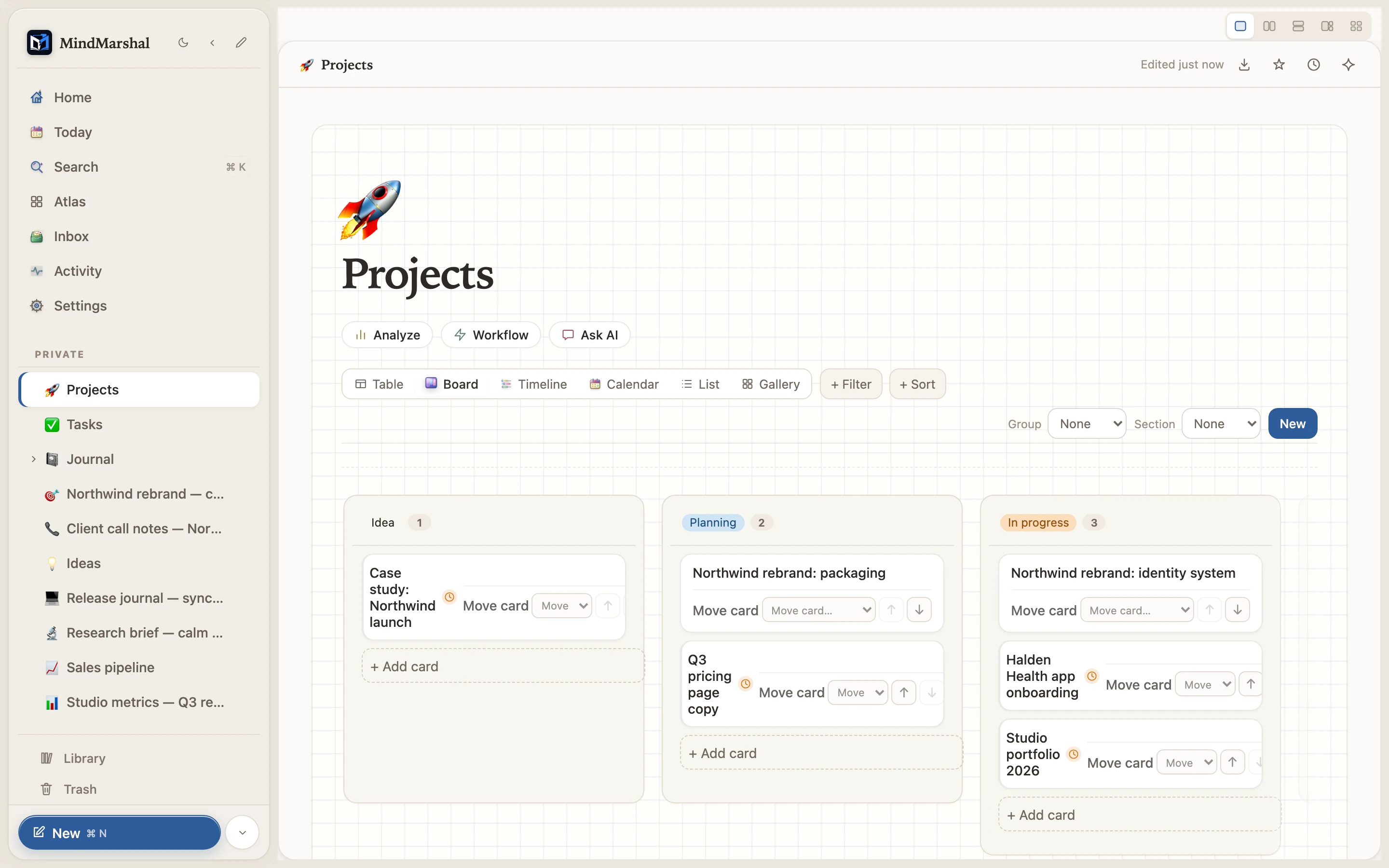
A database is most useful when the same records can answer different questions without being copied. Mind Marshal provides table, board, list, calendar, gallery, and timeline views. Use the view that matches the decision in front of you:
- Table: What is the complete inventory, and which fields are missing?
- Board: Where is work stuck, and what can move from waiting to active?
- Calendar: What is time-sensitive this week?
- Timeline: Which projects overlap or create an unrealistic sequence?
- List: What is the shortest next-action queue?
Do not create every view merely because it exists. A dashboard with two trusted views is more useful than six views no one opens.
Build a 20-minute first version
- Capture the open loops. Write down only the projects you are actively carrying. Do not migrate years of history.
- Name a concrete outcome. Replace vague labels such as “website” with a result such as “publish the revised pricing page.”
- Add one next action. If an item has no next action, mark it waiting or decide whether it should remain on the dashboard.
- Choose one status view. A simple board or list is enough to start.
- Add dates selectively. Put real deadlines on the calendar. Avoid turning every intention into a false due date.
- Review once a week. Close stale work, renew the next action, and make the week’s commitments visible.
This is the same capture, clarify, plan, and review rhythm described in our personal productivity system guide. The dashboard gives that rhythm a durable home.
Keep project notes connected to the action
A task title alone rarely contains enough context to act. Attach or link the relevant meeting note, brief, research page, or decision record from the project entry. Then the next action can remain short while the reasoning remains available nearby. This makes an offline workspace practical for travel, unreliable connectivity, or focused work away from chat.
Mind Marshal keeps notes, a quick-capture inbox, databases, daily journal, and search in one local SQLite workspace. That does not make the workspace a hosted team hub. It lets you retain the personal context around your work without requiring a product account for ordinary writing and planning.
Use the dashboard beside the shared source of truth
A personal dashboard should improve follow-through, not hide decisions. When a task belongs to a team, keep the canonical assignment, public status, and final decision in the shared tool the team already uses. In your dashboard, store the context you need to prepare, follow up, and remember the next action. After a meeting or work session, send the visible update back to the agreed channel.
If a small technical team needs live co-editing on a working page, it can consider the optional relay described in our self-hosted collaboration guide. That remains a team-operated service, not Mind Marshal cloud sync.
Make the weekly review the authority
The dashboard is only as trustworthy as the review that maintains it. Reserve a small recurring window to inspect active projects, turn vague intentions into a next action, and remove work you no longer intend to do. A system earns trust by becoming easier to use than avoiding it.
Start with a real project
Build the smallest dashboard that makes tomorrow clearer.
Mind Marshal keeps project notes and database views in Free Core with no time limit. The optional 14-day Pro evaluation adds AI and automation without requiring an account, email address, or card.